Your email never
leaves your device.
MailBroom connects to any IMAP email account and uses AI to classify, bulk-delete, unsubscribe, and organise your emails — with every scan and every decision made by an on-device model, not a server. Sweep Mode guides you through your inbox one sender at a time — colour-coded cards suggest the right action instantly, clearing thousands of emails in minutes.
App Store Privacy Label: “Data Not Collected”Verified on the App Store — see MailBroom's privacy details
How It Works
Clean in three steps
Connect your inbox
Enter your IMAP server details (Gmail, Outlook, iCloud, or any email provider). Credentials are stored in iOS Keychain only — never sent to any third party.
AI scans & classifies
MailBroom analyses your senders, ranks them by volume, and classifies every email as Junk, Lists, or Keep — entirely on-device. For large inboxes, Sweep Mode launches automatically.
Sweep, delete & organise
Sweep Mode presents colour-coded sender cards — red for delete, orange for unsubscribe, blue for keep. One tap per sender clears 10,000 emails in minutes.
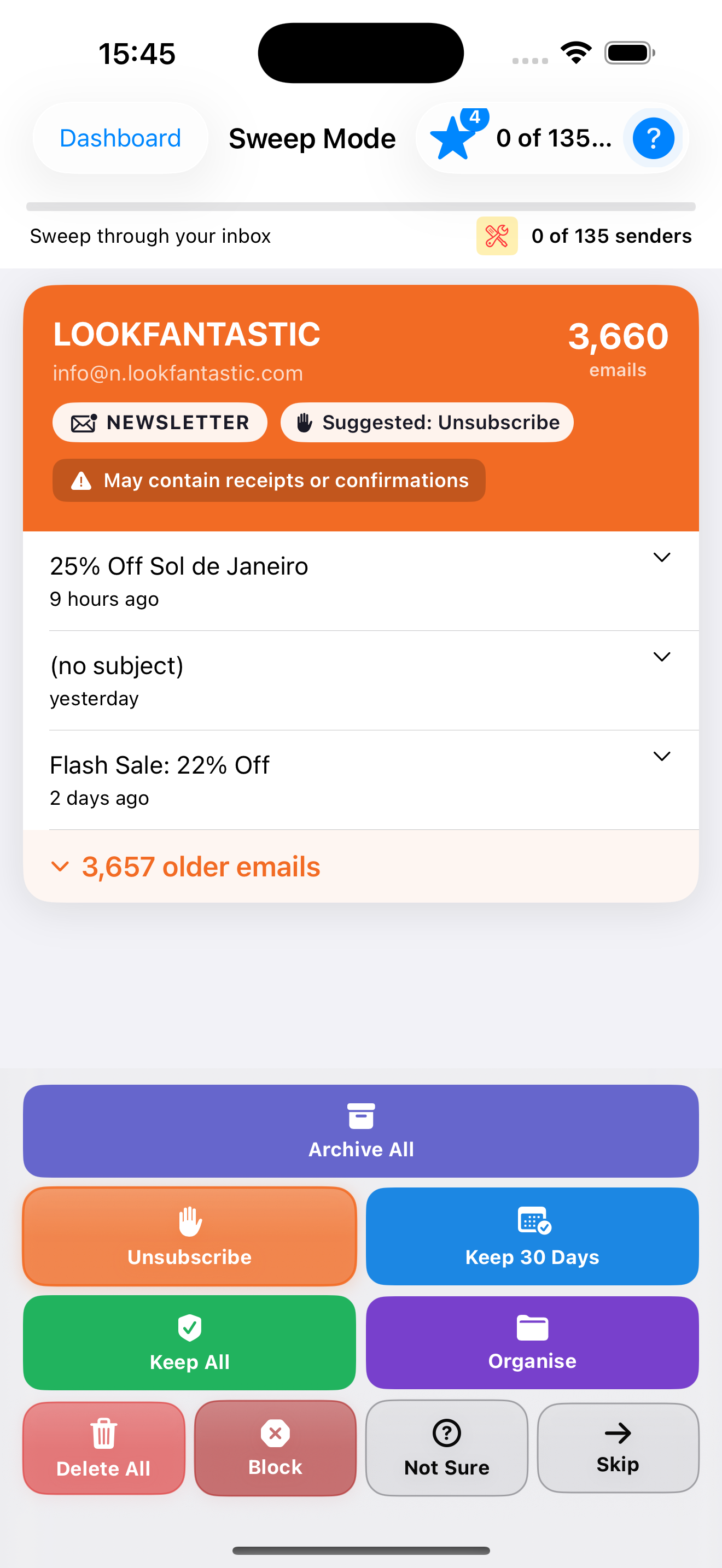
Sweep Mode
The fastest way to conquer a large inbox. MailBroom ranks your senders by volume — newsletters, retailers, and notifications first — then guides you through them one at a time. Colour-coded cards suggest the right action so you barely have to think. Free users get 5 sessions total (one-time allowance, never expires); Pro users get unlimited.
- ✓🔴 Red = Delete · 🟠 Orange = Unsubscribe · 🔵 Blue = Keep 30 Days
- ✓Suggested action button highlighted — tap and move on
- ✓Shows 3 recent emails per sender — tap to read the full content
- ✓On-device AI flags emails that may need saving before you delete
- ✓Progress saved — exit and resume any time
- ✓Every decision trains the AI for smarter future sweeps
- ✓⭐ Free sweeps remaining shown in toolbar with colour-coded badge
Storage Cleanup
Free up space by deleting old, large emails in bulk. MailBroom groups senders by how much storage they use — browse by age bracket or by email domain to bulk-clean an entire organisation at once. D / U / K badges on every sender let you mark Delete, Unsubscribe, or Keep in seconds.
- ✓By Age view: browse senders grouped into brackets — 10+ years, 5–10 years, 3–5 years, 1–3 years
- ✓By Domain view: group all senders from the same domain (e.g. @amazon.co.uk) and clean them together
- ✓Tap any sender to expand inline — see their recent emails, then open a full email view
- ✓D / U / K action badges — Delete, Unsubscribe, or Keep per sender
- ✓AI risk badges — green (safe to delete), orange (check first), grey (review)
- ✓Fast bulk delete using atomic IMAP MOVE — hundreds of emails cleared in seconds
- ✓Auto-reconnects if the mail server drops the connection mid-session

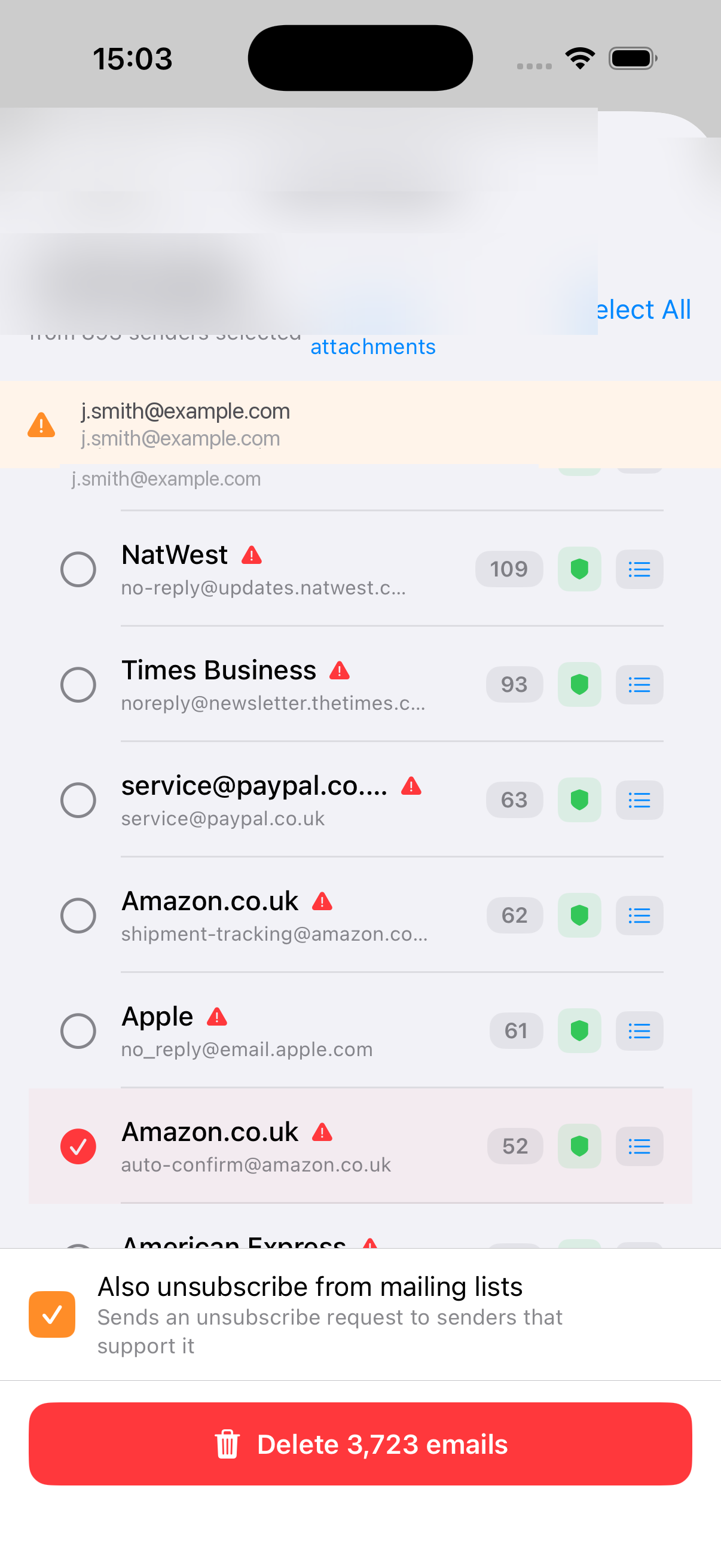
Smart Delete
Groups Junk and Lists emails by sender. Risk scoring warns you before deleting receipts or order confirmations. Bulk-delete thousands of emails in seconds with one tap.
- ✓Sender-grouped view with email counts
- ✓Receipt & invoice risk warnings
- ✓Quick-keep by date (last month, 6 months, year)
- ✓Optional one-click unsubscribe while deleting
- ✓Works offline — deletions queue and sync when reconnected
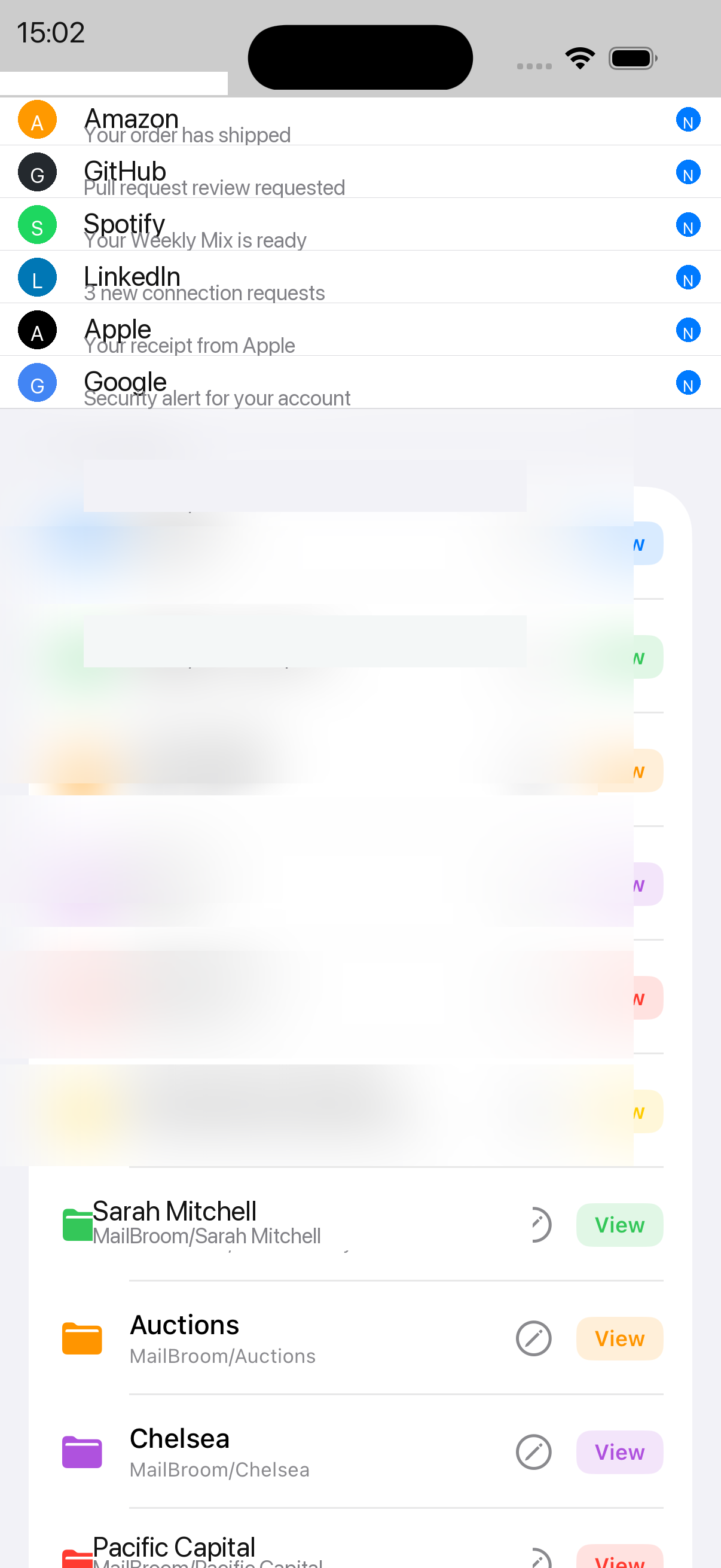
Smart Organise
Create named folders on your own mail server and file emails by sender. Set rules once — MailBroom files future emails automatically, even pushing them to Gmail filters and Outlook server rules so emails are sorted the moment they arrive.
- ✓Create colour-coded server folders with custom icons
- ✓Edit folder name and icon — swipe left on any folder to customise
- ✓Search by sender, address, or keyword
- ✓Stage emails by date range, then apply in bulk
- ✓Auto-rules: create rules from a move with one tap
- ✓Filter rules by read status — Any, Read, or Unread
- ✓Gmail & Outlook: rules pushed to the server instantly
- ✓iCloud & IMAP: rules applied automatically on every scan
- ✓Works offline — moves queue and sync automatically when reconnected
Smart Unsubscribe
Sends RFC 8058 one-click unsubscribe requests on your behalf — the proper opt-out standard supported by Gmail, Outlook, and all major senders.
- ✓Works with all RFC 8058 compliant senders
- ✓Runs silently in the background
- ✓Combine with Smart Delete for a clean sweep
- ✓No fake 'unsubscribe' workarounds
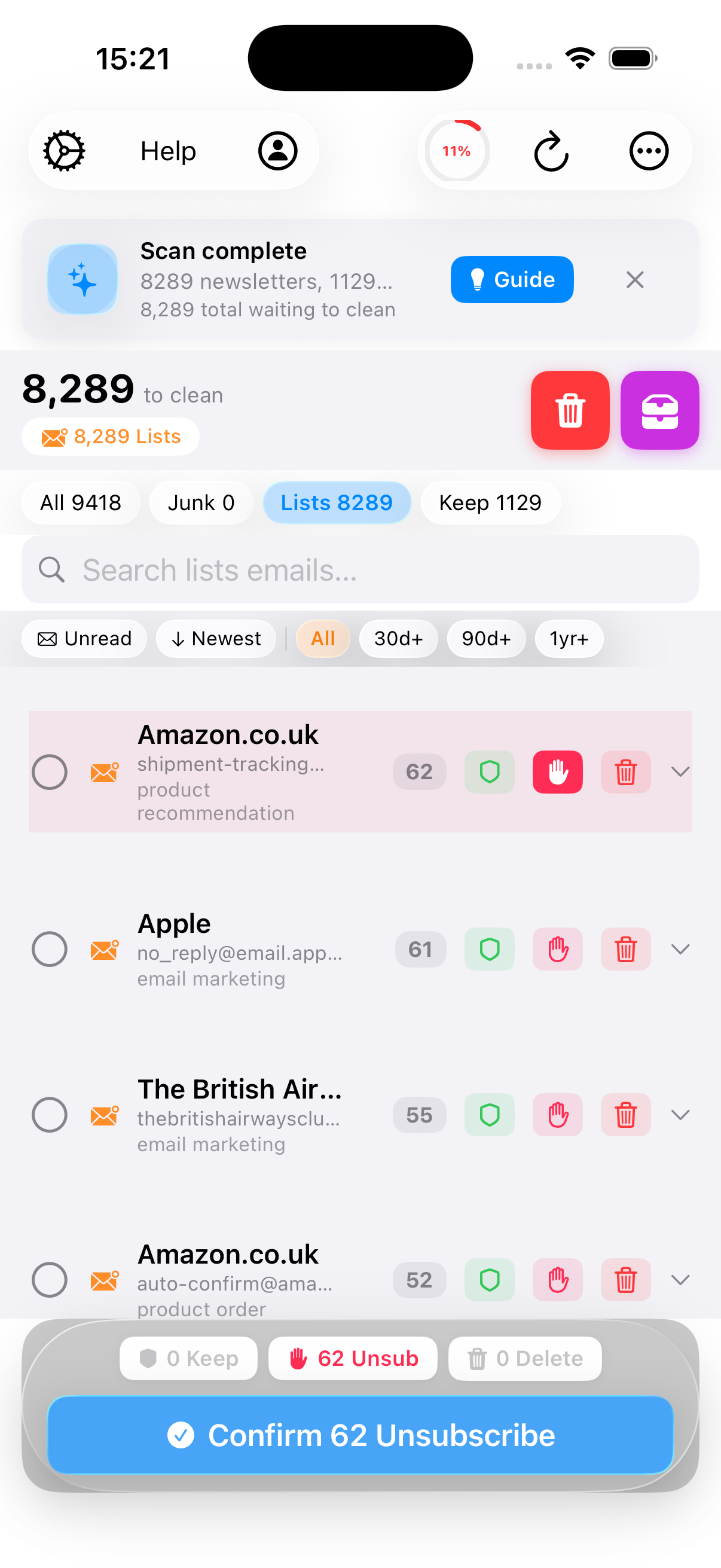
Smart Sweep Grouped Mode
Group senders by category, choose a different action for each sender, then execute them all in bulk. AI suggests the safest action based on sender type — Keep (with date options) for newsletters, Delete for high-volume junk. Takes priority over individual sweeps in Pro mode.
- ✓Filter by category: Newsletters, Retail, or Promotional
- ✓Optional filters: unread only, older than 90 days
- ✓Senders organised by category with email counts visible
- ✓4 action options per sender: Keep (with Keep Options), Delete, Unsubscribe, Quick Apply
- ✓AI pre-selects safest action based on sender classification
- ✓Colour-coded action pills for instant visual feedback
- ✓Bulk Apply button to execute all selected actions at once
- ✓Real-time progress tracking during bulk execution
- ✓Delete available at group level for high-volume senders
- ✓Unsubscribe sends the opt-out request and deletes emails in one step
- ✓Bulk actions pause individual sender sweep, then resume after completion
- ✓Perfect for large inboxes — process 60+ senders in minutes instead of hours
Power Search
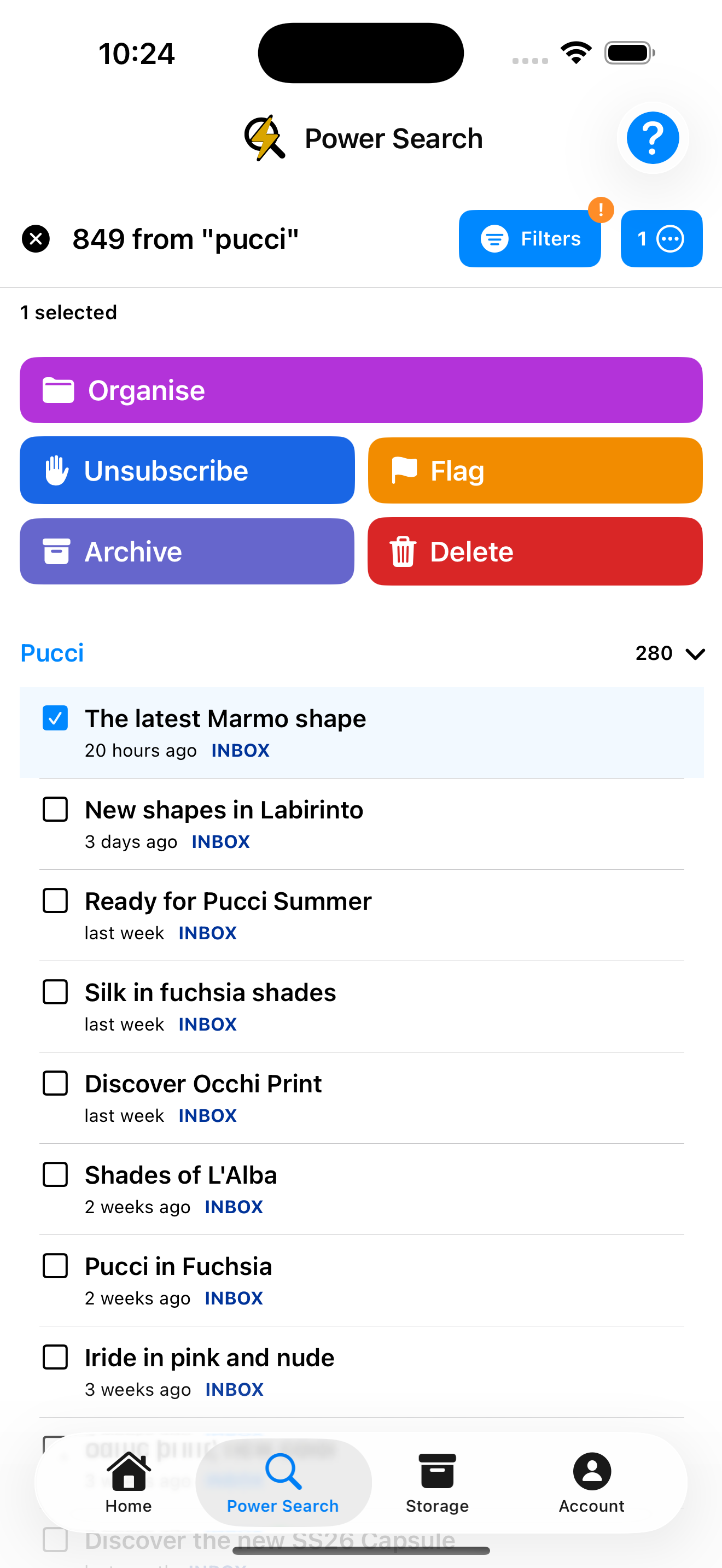
Search your entire inbox by sender, keyword, date range, or folder. Bulk-select results and execute actions on hundreds of emails at once — delete, organise, unsubscribe, or flag in one tap.
- ✓Search by sender address, name, or keyword across all folders
- ✓Advanced filters: date range, read/unread, attachments
- ✓Bulk-select all results or individual emails
- ✓One-click bulk actions: Organise, Unsubscribe, Archive, Delete, Flag
- ✓See how many emails match your search before acting
- ✓Works across all your IMAP folders, not just inbox
Draft Reply with Apple Intelligence
MailBroom detects emails that need a reply — unread messages, requests with phrases like "let me know" or "please confirm", and emails you've read but never responded to. Tap "Draft a Reply" and Apple Intelligence writes a suggested response on-device. Completely private — no internet, no API key, no data leaves your phone.
- ✓Needs Reply tab surfaces unanswered emails automatically
- ✓Apple Intelligence drafts a reply on-device (iOS 26+)
- ✓Edit the draft before sending — MailBroom never sends on your behalf
- ✓Opens Mail app with To, Subject and body pre-filled
- ✓Falls back to a smart template on older devices
- ✓Free: 3 scans · Pro: unlimited
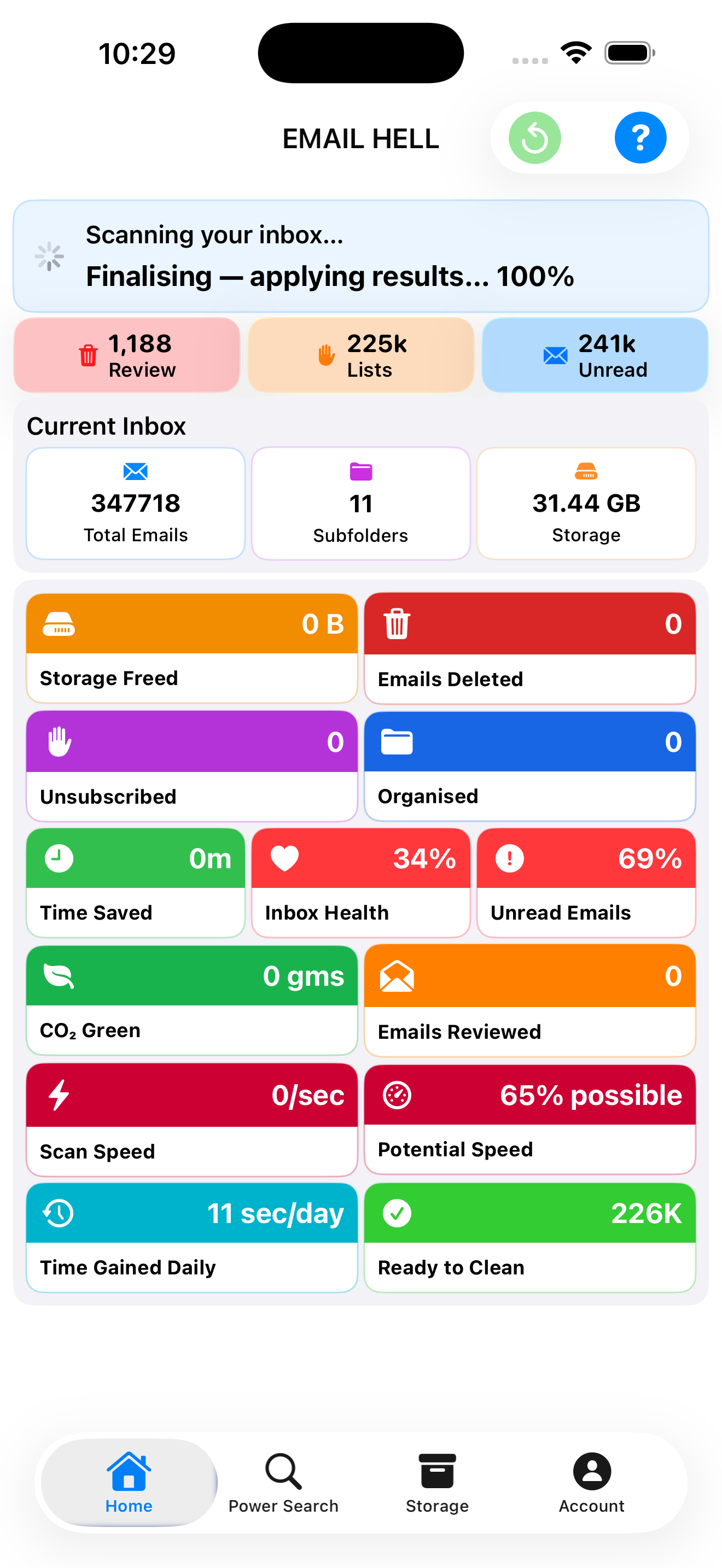
Dashboard
Track your inbox health at a glance
Time Saved
MailBroom estimates hours of manual cleanup work you've avoided. Each delete saves ~8s, unsubscribe ~40s, organise ~15s.
Inbox Health %
The percentage of your current inbox classified as Keep — emails you want to see. Higher percentage means your inbox is cleaner and more focused.
Action Breakdown
Track emails deleted, unsubscribed from, and organised separately. See metrics from Sweep Mode, Smart Delete, and Smart Organise combined.
100% Private by Design
MailBroom has no server, no account, and no cloud. Your emails are downloaded directly from your mail server to your phone over IMAP. They are classified on-device and never transmitted anywhere. Your credentials are stored exclusively in iOS Keychain.
Pricing
Free to try · 99p intro offer · Cancel anytime
No credit card required. No trial expiry. When you upgrade, your subscription renews monthly until you cancel in iPhone Settings – cancel anytime, no questions asked.
Free tier includes: 5 Sweep sessions · 1 mass delete · 5 unsubscribes · 3 AI replies · 1 organise rule. One-time allowance — never expires.
Love MailBroom? Upgrade to Pro for just 99p for your first month, then £1.99/month to unlock unlimited cleanups, sweeps, and every feature. Cancel anytime in your iPhone Settings.
Even at £1.99/month, that beats Clean Email (£7.99) by a country mile. Your emails never leave your phone.
"Cleared my 45,000-email work inbox in 11 minutes. No cloud, no crash."
— MailBroom Beta Tester
What counts as a "cleanup" or "sweep"?
Storage Cleanup
One bulk action (Delete, Unsubscribe, or Keep) on a sender or domain. For example: delete all emails from one sender, or unsubscribe + delete all senders from a domain.
Sweep
Clear all emails from one sender using Smart Triage. Choose delete, keep 30 days, unsubscribe + delete, or any combination.
Free tier: 5 sweeps · 1 mass delete · 5 unsubscribes · 3 AI replies · 1 organise rule. No time limit — they never expire.
| Feature | Free | Pro |
|---|---|---|
| Scan & AI-classify emails | ✓ | ✓ |
| View & read emails | ✓ | ✓ |
| Scan coverage | Full inbox | Full inbox |
| Mute sender · Keep Newest · Activity Log | ✓ | ✓ |
| Safe senders | ✓ | ✓ |
| Needs Reply scans | 3 scans | Unlimited |
| Sweep Mode (guided inbox clearing) | 5 sessions | Unlimited |
| Smart Sweep grouped actions | Preview only | ✓ |
| Smart Delete | 1 mass delete | Unlimited |
| Smart Unsubscribe | 5 operations | Unlimited |
| Smart Organise & folder rules | 1 rule | Unlimited |
| Custom folder icons & names | ✓ | ✓ |
| Power Search (search & bulk action) | ✓ | ✓ |
| Offline action queue (sync on reconnect) | ✓ | ✓ |
| Server-side rules (Gmail / Outlook) | ✗ | ✓ |
| Email accounts | 1 account | 3-50 accounts (by plan) |
Choose your plan
All Pro plans include every feature above · prices may vary by region · cancel any time
| Email accounts | Plan type |
|---|---|
| Up to 3 accounts | Tier 1 |
| Up to 10 accounts | Tier 2 |
| Up to 20 accounts | Tier 3 |
| Up to 50 accounts | Tier 4 |
Monthly and yearly prices are provided in the App Store at purchase time.
Try before you buy with free actions · Subscriptions managed by Apple · Cancel any time
Why MailBroom?
How MailBroom compares
| Feature | MailBroom | Clean Email | Spark Mail |
|---|---|---|---|
| Free tier | 5 sweeps · 1 mass delete · 5 unsubs · 3 AI replies | 1,000 emails | Very limited |
| Free trial (requires card) | No | Yes (14 days) | Yes (7 days) |
| Pro monthly price | 99p intro² · £1.99/mo | ~£7.99 | ~£4.99¹ |
| Cancel anytime | ✓ | ✓ | ✓ |
| On-device AI (private) | ✓ | ✗ | ✗ |
| Bulk delete by sender | ✓ | ✓ | ✗ |
| One-click unsubscribe | ✓ | ✓ | ✗ |
Why choose MailBroom?
Try it free. Really free.
No credit card form. No "cancel before 14 days or we charge you." 5 sweeps, 5 unsubscribes, 1 mass delete, 3 AI replies — use them or don't. They never expire.
Try Pro for 99p. Then £1.99/month.
First month is just 99p. Then £1.99/month – less than a third of the competition. Cancel anytime if you don't need it.
Your emails never leave your phone.
Every other app (except one that costs £60/year) processes your emails on their servers. MailBroom's AI runs entirely on your iPhone.
One app does what two others do.
Bulk delete + unsubscribe + AI draft replies + server-side rules. All in one app. All for 99p.
What users say
"Used my 5 free sweeps to clear 8,000 emails from old newsletters. Upgraded to Pro for 99p to finish the rest. Cheaper than a vending machine coffee."
— Sarah K.
"I was paying Clean Email £8/month. MailBroom does the same thing for £1.99 – and my emails never hit a cloud server. That's 75% cheaper."
— David R.
"No trial expiry stress. No card on file. Just free cleanups then 99p when I needed more. Every app should work like this."
— James T.
Frequently asked questions
Do I need to enter a credit card to try the free tier?▼
No. Download the app and use your free allowance: 5 sweeps, 1 mass delete, 5 unsubscribes, 3 AI replies, 1 organise rule. No card required unless you upgrade.
What counts as one 'cleanup'?▼
One cleanup = one bulk action (Delete, Unsubscribe, or Keep) executed via Storage Cleanup. For example: deleting all emails from one sender = one cleanup. The By Domain view lets you act on all senders in a domain at once.
What counts as one 'sweep'?▼
One sweep = using Smart Triage to clear all emails from one sender with options like Delete All, Keep 30 Days, or Unsubscribe + Delete.
If I upgrade to Pro, can I cancel next month?▼
Yes. Subscribe for 99p, cancel anytime in iPhone Settings → Subscriptions. No minimum commitment.
Does the free tier ever expire?▼
No. Your free allowance (5 sweeps, 1 mass delete, 5 unsubscribes, etc.) is yours forever. Use them today, next year, or never. No expiry.
Compatibility
Works with every inbox
Privacy & Permissions
Signing in with Google
For Gmail accounts, MailBroom offers Sign in with Google as a faster alternative to entering IMAP credentials manually. When you connect this way, MailBroom requests permission to read, organise, and delete messages in your Gmail account on your behalf — this is what powers Sweep Mode, Storage Cleanup, Smart Organise, and Smart Unsubscribe. MailBroom never sees or stores your Google password, and all email processing happens on your device — nothing is sent to AIERT's servers or any third party. You can revoke MailBroom's access at any time from your Google Account permissions page.
Ready to reclaim
your inbox?
Try before you buy with free actions · Upgrade to Pro when you reach your limits · Your emails never leave your phone.
🍎 Download on the App StoreiOS 17.0+ · iPhone & iPad · Try before you buy with free actions · Pro plans in the App Store · cancel any time